UoftCTF 2026 Writeup


Pretty cool CTF with some nice reversing challenges, played this one with Shellphish and we full swept rev within two hours 💪. Managed to solve a couple more challenges, but didn't have time to post writeups for it, so here ya go:
Challenge #1: Bring your own program
Category: rev
Author: SteakEnthusiast
Challenge prompt:
Team K&K discovered a mysterious emulator for an unknown architecture. I wonder what kind of programs it can run...
Challenge handout has a number of files including a heavily obfuscated/minified javascript file named chal.js. All other files are just to setup the JS jail for this challenge.
Since the file is impossible to read like this, we run it through a beautifier for better understanding. From the beautified file, we can find the main function which gets executed when we run the program:
const rl = readline.createInterface({
  input: process.stdin,
  output: process.stdout,
  terminal: false,
});

const vm = new VM(GLOBALS);
let done = false;

rl.on('line', (line) => {
  if (done) return;
  const s = line.trim();
  if (!s) return;
  done = true;
  try {
    const bytes = parseHexInput(s);
    const prog = decodeProgram(bytes);
    validateProgram(prog);
    const result = vm.run(prog);
    process.stdout.write(String(result ?? '') + '\n');
    rl.close();
    process.exit(0);
  } catch(err) {
    process.stdout.write('ERR\n');
    rl.close();
    process.exit(1);
  }
});

rl.on('close', () => {
  if (!done) {
    process.stdout.write('ERR\n');
    process.exit(1);
  }
});
One small change I made to this snippet of code is to replace the generic error messages with explicit ones like this:
// process.stdout.write('ERR\n');
process.stdout.write(String(err?.message || err) + '\n');
My initial impression of looking at this file was that this was some kind of custom VM written in JS and that we need to provide it some bytecode to be able to read the flag file. But we shall find out.
So from this piece of code when the program recieves an input it parses the input as bytes using parseHexInput() which basically constraints the input string to be a valid hex string and to be of even length. It then feeds these bytes to decodeProgram()
function decodeProgram(bytes) {
  let i = 0;
  const need = (n) => {
    if (i + n > bytes.length) throw new Error('truncated');
  };

  need(2);
  const numRegs = bytes[i++];
  const numConsts = bytes[i++];

  console.log(`numRegs: ${numRegs}`)
  console.log(`numConsts: ${numConsts}`)

  const consts = [];
  for (let c = 0; c < numConsts; c++) {
    need(1);
    const tag = bytes[i++];
    if (tag === 1) {
      need(8);
      const v = readF64LE(bytes, i);
      i += 8;
      consts.push(v);
    } else if (tag === 2) {
      need(2);
      const len = readU16LE(bytes, i);
      i += 2;
      if (len > LIMITS.strLen) throw new Error('str too long');
      need(len);
      const str = Buffer.from(bytes.slice(i, i + len)).toString('utf8');
      i += len;
      consts.push(str);
    } else {
      throw new Error('bad const tag');
    }
  }

  const code = bytes.slice(i);
  if (code.length > LIMITS.codeBytes) throw new Error('code too long');
  return { nr: numRegs, cs: consts, code };
}
Now this is an interesting function but it's pretty simple to understand, it has an arrow function need() which always checks if we have enough bytes in the buffer for the next operation, otherwise it throws an error.
The first two bytes of the program are parsed as number of registers and number of constants in out bytecode. Each constant also begins with a one‑byte tag telling us what type of constant it is, from the function above it can be either:
-
tag == 1------> float64 (8 bytes) -
tag == 2------> string (variable length)
For string constants the next two bytes define the length of the string and then we slice those many bytes from the bytecode and store it.
Finally we return from this function by returning an object which has number of registers, number of constants and the remaining bytecode.
return { nr: numRegs, cs: consts, code };Then we feed this object to validateProgram() function
In the function prologue it again checks if the object we provided has registers and constants within a defined range or not. Then from the remaining bytecode before we start extracting opcodes and check the validity of each opcode:
  while (i < code.length) {
    const op = code[i++];
    switch (op) {
      case OPCODE.LOAD_CONST: {
        need(2);
        const r = code[i++];
        const c = code[i++];
        if (r >= prog.nr || c >= prog.cs.length) throw new Error('bad load');
        break;
      }
This function is merely for checking if the bytecode translates to valid opcodes and instructions, the VM.run is the actual interpreter for our bytecode, so let's look at it. This part may look very confusing but I'll try my best to break it down to you.
First we need to understand the capability object of this VM:
envCaps is a object of class Env which exposes some very small helper functions to do trivial tasks as well as two functions: one to read only public files (constrained to a directory) and another to read any file on the system. We'll call it safeRead and unsafeRead for now. To give you a better idea this is how the capability object is laid out:
caps
  |
  |----> key 3 --> Env capsIO
     |
     parent envIoVersion:
       |
       |----> parent envIo:
       |   |
	   |   |----> key 10 --> safeRead  // read only in /data/public
       |   |
	   |   |----> key 0 --> unsafeRead // read any absolute path
       |
	   |----> key 11 → "io/3.0.0"
So in theory we could use unsafeRead with key 0 to read the file but the key is not present in the set of allowed keys which are: [1, 2, 3, 4, 10, 11]. So we need to find another way.
These 2 functions define the caching functionality of our VM where cacheGet() tries to lookup an existing cache at the given program counter. If it does then it checks the shape, key and the shapeversion (more about this later) to find that entry. Then we iteratively walk up the env chain to get the env which holds that object and return that function and the object from out bytecode.
cachePut() on the other hand checks if the object returned from resolve is ok: true to be cached. Then we get/create a cache entry based on whether there is already a cache entry present. Also if we reach the cache entry limit, we clear the entries and return.
    const cacheGet = (pc, recv, key) => {
      const ic = this.ic.get(pc);
      if (!ic || ic.m) return null;
      for (const ent of ic.c) {
        if (ent.rs !== recv.sh.id) continue;
        if (ent.k !== key) continue;
        if (ent.v !== shapeVersion) continue;
        let obj = recv;
        for (let i = 0; i < ent.d; i++) {
          obj = obj.p;
          if (!(obj instanceof Env)) return null;
        }
        return { fn: obj.sl[ent.si], th: recv };
      }
      return null;
    };

    const cachePut = (pc, recv, key, res) => {
      if (!res.ok) return;
      if (res.h.dm) return;
      let ic = this.ic.get(pc);
      if (!ic) {
        ic = new InlineCache();
        this.ic.set(pc, ic);
      }
      if (ic.m) return;
      if (ic.c.length >= LIMITS.inlineCacheEntries) {
        ic.c = [];
        ic.m = true;
        return;
      }
      ic.c.push({
        rs: recv.sh.id,
        k: key,
        v: shapeVersion,
        d: res.d,
        si: res.si,
      });
    };
prepWrite() is the main function which triggers these helper functions. It uses resolve(env, key) to walk up the env parent chain starting from env until it finds an env holder that actually has the property key. It then checks if holder is in dictionary mode, if not then it sets:
holder.dm = true- Collects all
key, valuepairs fromholder.sh.mandholder.sl - Sorts these
pairsby key and replacesholder.slwith the values sorted by that key order
This is where the bug lies in this program, because a carefully written bytecode can be used to re-order the safeRead and unsafeRead functions in holder.sl. This function also bumps up the shapeVersion based on the holder.h flag which is very critical to trigger the bug.
Exploiting the bug
Initially we start with the IO holder in shape mode, which looks something like this:
sh.m = { 10: 0, 0: 1 }
sl   = [ safeRead, unsafeRead ]
dm   = false
Then at some call to PC we can do GET_PROP_ICfor key 10 (safeRead). Since there is no such object in the cache right now we get a cache miss and the resolve functions walks up the parent chain and returns the env holder that has key 10. After returning we call cachePut() to store this object for future references:
{
  rs: F7.sh.id,
  k: 10,
  v: shapeVersion,
  d: 2,
  si: 0      // slot 0 had safeRead
}
Now we call prepWrite with key 10 which results in resolve being called again. This time it find and returns the cache entry and changes the holder from shape mode to dictionary mode, then re-orders holder.sl to [unsafeRead, safeRead] since key 0 < 10.
sh.m = { 10 → 0, 0 → 1 }
sl   = [ unsafeRead, safeRead ]
dm   = true
shapeVersion: same as before
Finally calling GET_PROP_IC for same key 10, results in resolve returning the old cache entry since shapeVersion was never bumped up where the key 10 now corresponds to unsafeRead instead of safeRead.
Challenge #2: Symbol of Hope
Category: rev
Author: SteakEnthusiast
Challenge prompt:
Like a beacon in the dark, Go Go Squid! stands as a symbol of hope to those who seek to be healed.
This is a simple challenge, but I'll talk a bit about angr and symbolic execution for newbies. Since this is only the second time I've used angr on a CTF challenge lol.
Initial Look
For the challenge handout we've been given a simple flag checker binary named checker. When simply running it and testing it, its asks for user input and rejects/accepts it, pretty standard and nothing fancy so far. Running file on this reveals that it's a statically compiled binary but the section header is missing which is not a good sign.
After this I decided to open this in IDA to have a better look at what it's doing, but when I opened it in IDA I noticed something very strange. The binary only has 5-6 functions:
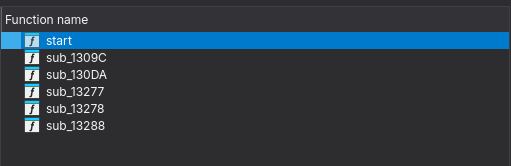
and there is a big blog of bytes possibly our code which has been laid out as bytes, but if we simply try to convert these bytes into code using IDA it gives us obscure instructions, so we're probably missing something.
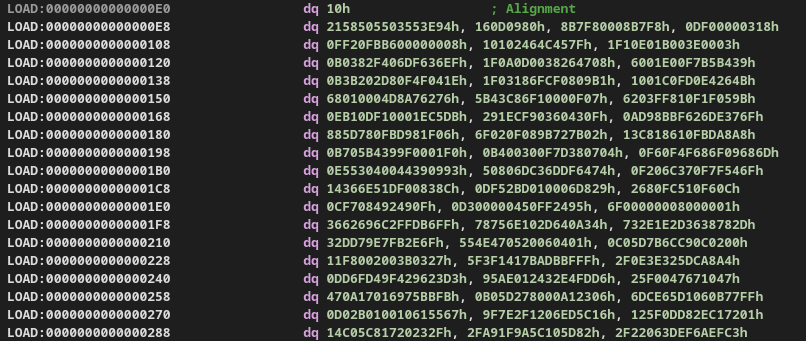
But if we look at the Strings in this binary it gives away why this binary looks so weird. Looking at this string: $Info: This file is packed with the UPX executable packer we know that the binary is packed with upx and this is why IDA only shows us a tiny stub while the rest of the actual code is compressed and unpacked at runtime.
Now we can simply unpack the file using upx and take a look at the actual file using: upx -d checker
Looking at the actual file
Opening the actual binary in IDA, we can see a whopping 4231 functions!
If we take a look at the decomp of the main function:
int __fastcall main(int argc, const char **argv, const char **envp)
{
  unsigned __int64 i; // [rsp+0h] [rbp-80h]
  char v5[48]; // [rsp+10h] [rbp-70h] BYREF
  char s[56]; // [rsp+40h] [rbp-40h] BYREF
  unsigned __int64 v7; // [rsp+78h] [rbp-8h]

  v7 = __readfsqword(0x28u);
  if ( fgets(s, 46, _bss_start) && strcspn(s, "\r\n") == 42 )
  {
    for ( i = 0LL; i <= 41; ++i )
      v5[i] = s[i];
    f_0(v5);
    return 0;
  }
  else
  {
    puts("No");
    return 0;
  }
}
We see that it takes our input and rejects it if the length is not 42. It then copies it into a buffer and passes it to f_0.
Now looking at function f_0, it modifies the buffer and then passes it to function f_1 and so on until function f_4200. Function f_4200 compares the modified input buffer to pre-existing bytes and if it matches then we're good.
But the problem at hand is that there are 4200 functions and it's really hard to look at each one manually let alone reverse them. So let's try to find a pattern within these functions.
If we take a look at some of these function we can see that all these functions perform byte assignment at some index of the input buffer. There are two important things to note here:
- The byte assignments are independent of each other meaning each function only modifies a single byte in the input buffer.
- These are very trivial operations so should be fairly easy to reverse.
So in theory, we can build a reverse map for each function and call it on the expected bytes to get to the actual flag. But doing that for 4200 is literal insanity.
Enter: Symbolic Execution
Since finding the correct input which gets us the flag is very hard with normal execution we should give symbolic execution a try. If you're new to the concept of symbolic execution I'll try my best to give you a fair gist of it.
Symbolic Execution is a great way to understand program execution and program behavior under different inputs, conversely it also helps us find that input given an execution path. In symbolic execution we don't work with fixed variable values, instead we define symbolic variables which do not have a defined value but rather accumulate constraints throughout the process execution. And at the end present it in the form of an equation which can be solved to get the desired value.
This way symbolic execution let's us explore multiple paths that a binary can take and then let's us choose which path are we interested in and how do we get there.
Time to get angr-y
angr is an excellent framework for symbolic execution on binaries and we'll use that to solve this problem.
First we'll load the binary in angr and create an angr project and define our flag length which we know is 42 bytes long (43 with a newline).
BIN_PATH = "./checker"
FLAG_LEN = 42            # maybe 43 if newline is included; adjust if needed

proj = angr.Project(BIN_PATH, auto_load_libs=False)
Next we'll create symbolic variables for each character of our flag string, for this we'll use claripy which is angr's abstraction layer on top of z3. For each character of the flag we'll create a symbolic variable using claripy.BVS(name, size_in_bits). We can name each character of the flag based on it's index for simplicity and since each character in C takes 1 byte, we'll define these symbolic vars. as 8 bits long.
flag_chars = [claripy.BVS(f'flag_{i}', 8) for i in range(FLAG_LEN)]
flag = claripy.Concat(*flag_chars)
Now we'll create a state for our program in angr, a state let's us access the program's memory, registers and every object during the emulation of the program. If you're curious you might dump a register value in a particular state and find a symbolic variable instead of a concrete value inside it like this: <BV64 reg_48_11_64{UNINITIALIZED}>. We'll choose the state as the entrypoint of the program with .entry_state() and provide our flag (symbolic variable) as the input.
state = proj.factory.entry_state(stdin=flag)Next we can define some custom constraints on the input flag other than the ones that the binary imposes, and that is to constrain every flag char. variable to be in the ASCII printable range, we can actually further modify them based on the regex of the flag format but this is more generalized. This step isn't necessary but is good practice to include and will tighten our constraints.
for c in flag_chars:
    state.solver.add(c >= 0x20, c <= 0x7e)
Next and very important step is to declare a simulation manager, since symbolic execution goes over multiples states, we need a Simulation Manager to manage all these states so that we can explore and find the path that leads us to the success state. Speaking of which we also need to define a success state and optionally a fail state.
In function f_4200 we accept/reject the block based on a simple compare operation, which makes the binary take one of two paths (correct/incorrect flag). We can use the address of these blocks of code as our success/failure states. Since PIE is enabled we need to make sure add the base address of the binary along with the offset we get from IDA and then we simply tell the simulation manager to find a path which gets us to the success state and avoid all paths which get us to the failed state.
BASE = proj.loader.main_object.mapped_base
print("BASE =", hex(BASE))

ADDR_YES = BASE + 0x40E6F
ADDR_NO  = BASE + 0x40E80

simgr.explore(find=ADDR_YES, avoid=ADDR_NO)
At last if any such paths are found then we use the solver to print the input that was used to reach that path:
if simgr.found:
    found = simgr.found[0]
    solve = found.solver.eval(flag, cast_to=bytes)
    print("FLAG:", solve)
else:
    print("No solution found")
Final solve script
import angr
import claripy

BIN_PATH = "./checker"
FLAG_LEN = 42            # maybe 43 if newline is included; adjust if needed

proj = angr.Project(BIN_PATH, auto_load_libs=False)

BASE = proj.loader.main_object.mapped_base
print("BASE =", hex(BASE))

ADDR_YES = BASE + 0x40E6F
ADDR_NO  = BASE + 0x40E80

print("ADDR_YES =", hex(ADDR_YES))
print("ADDR_NO  =", hex(ADDR_NO))

# Create 42 symbolic bytes
flag_chars = [claripy.BVS(f'flag_{i}', 8) for i in range(FLAG_LEN)]
flag = claripy.Concat(*flag_chars)

# Supply symbolic input on stdin
state = proj.factory.entry_state(stdin=flag)

# Constrain to printable bytes (typical CTF flags)
for c in flag_chars:
    state.solver.add(c >= 0x20, c <= 0x7e)

simgr = proj.factory.simulation_manager(state)

# Explore until we hit the 'Yes' block, avoiding 'No'
simgr.explore(find=ADDR_YES, avoid=ADDR_NO)

if simgr.found:
    found = simgr.found[0]
    solve = found.solver.eval(flag, cast_to=bytes)
    print("FLAG:", solve)
else:
    print("No solution found")